THE LARGEST BMW 2-SERIES FORUM ON THE PLANET

2Addicts
2Addicts
BMW Garage BMW Meets Register Today's Posts
2Addicts | BMW 2-Series forum Technical Topics Navigation, iDrive, Audio, Video, Bluetooth, Phone, Cameras, Electronics Where can I tap reverse light wire?

Post Reply
 
Thread Tools
      03-08-2018, 06:49 PM   #1
stlb5
Captain
stlb5's Avatar
512
Rep
717
Posts

Drives: '19 M2C, '22 X4MC
Join Date: Jan 2017
Location: St. Louis

iTrader: (0)

Where can I tap reverse light wire?

I’m installing a reverse camera and I need to tap the reverse light wire to use as a trigger. Is there a spot on the passenger side of the trunk to tap this? I can’t see where the wires exit to the taillight.
Appreciate 0
      03-08-2018, 09:49 PM   #2
stlb5
Captain
stlb5's Avatar
512
Rep
717
Posts

Drives: '19 M2C, '22 X4MC
Join Date: Jan 2017
Location: St. Louis

iTrader: (0)

Never mind, I found it.
Appreciate 0
      03-09-2018, 07:28 AM   #3
MarcoZandrini
Major
United_States
553
Rep
1,486
Posts

Drives: 2018 M240i
Join Date: Jun 2017
Location: Virginia

iTrader: (0)

Where did you tap it?
Appreciate 0
      03-09-2018, 07:50 AM   #4
stlb5
Captain
stlb5's Avatar
512
Rep
717
Posts

Drives: '19 M2C, '22 X4MC
Join Date: Jan 2017
Location: St. Louis

iTrader: (0)

I found the info here:

https://www.newtis.info/tisv2/a/en/f...ersing-lights/

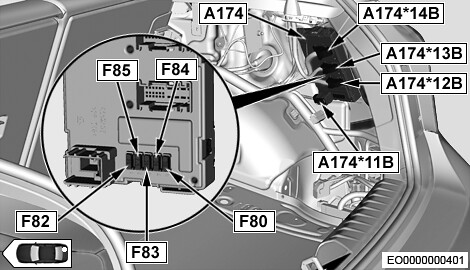
This is a view looking at the passenger side of the trunk with the carpet pulled down or removed. We are interested in the black box A174, in particular connectors A174*12B and/or A174*14B. Both connectors have the reversing wire we need to tap.


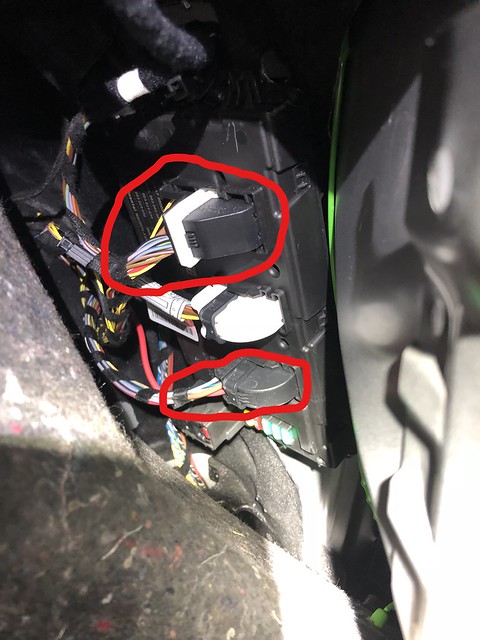
Here's what it actually looks like. The two connectors are circled.


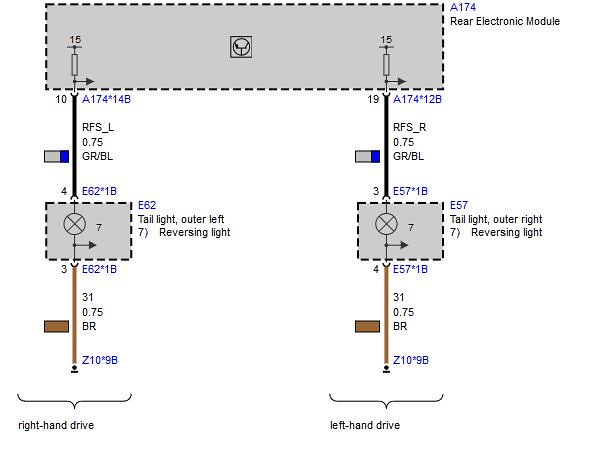
And here is the wiring diagram showing that we want the grey wire with the blue stripe out of either of the two connectors. Your choice. I went with the lower one because there was more wire to work with to make the tap.


I made the tap and then verified with a multi-meter. I got around 12.5 volts when I shifted into reverse. I then connected the wire to my Avin unit and it did trigger the unit to switch the screen and feed about 14.5 volts to the camera power wire. All's good and no need for a relay. Hope that helps.
Appreciate 3
ggggbmw543.00
ngl140.00
howiegu59.00
      12-14-2019, 06:03 PM   #5
Mark184
Enlisted Member
26
Rep
42
Posts

Drives: 2016 BMW M235i Xdrive
Join Date: Oct 2019
Location: Seattle,WA

iTrader: (0)

I'm installing a rear camera. The camera has a lead with red and black wires, and another yellow RCA lead with a red wire coming out of it. (not sure what purpose the red wire coming from the RCA serves). So thanks for your instructions about where to tap. Looks a bit intimidating. Did you disconnect anything to access the wires you tapped? You tapped the grey wire with the blue stripe. I assume I should tap the brown wire for the ground (black wire coming from camera). But boy... those wires look tight in there. I do have those cool little wire tap devices, but still curious- it looks like a connector on A174- like a latch. Will that disconnect the bundle and make it easier to tap the wires? Or did you just do in in place?

Many thanks again for your terrific post.

--Mark
Appreciate 0
      12-15-2019, 08:21 AM   #6
pmcmtnbkr
Second Lieutenant
pmcmtnbkr's Avatar
179
Rep
264
Posts

Drives: BMW M235I
Join Date: Oct 2019
Location: PA

iTrader: (0)

for those doing this you might want to install a relay the 12v signal from the tail light can be a bit dirty/weak and cause intermittent camera operation/ loss of pixles. you can use a standard automotive relay use the signal from the tail light to one of the coil terminals, connect the other side of the relay coil to ground. pull +12volts from the 12volt supply to your backup camera control module and connect it to the relay contact. the last relay contact goes to the camera trigger on your control box.
Appreciate 1
      12-15-2019, 12:48 PM   #7
Mark184
Enlisted Member
26
Rep
42
Posts

Drives: 2016 BMW M235i Xdrive
Join Date: Oct 2019
Location: Seattle,WA

iTrader: (0)

Quote:
Originally Posted by pmcmtnbkr View Post
for those doing this you might want to install a relay the 12v signal from the tail light can be a bit dirty/weak and cause intermittent camera operation/ loss of pixles. you can use a standard automotive relay use the signal from the tail light to one of the coil terminals, connect the other side of the relay coil to ground. pull +12volts from the 12volt supply to your backup camera control module and connect it to the relay contact. the last relay contact goes to the camera trigger on your control box.
The original poster- stlb5, didn't tap at the bulb, but rather at a wiring bundle. He said no need for relay. I'll be tapping into where he recommends later today. Waiting to get the right size positap connector for the ground. Hopefully this works!
Appreciate 0
      12-15-2019, 01:32 PM   #8
pmcmtnbkr
Second Lieutenant
pmcmtnbkr's Avatar
179
Rep
264
Posts

Drives: BMW M235I
Join Date: Oct 2019
Location: PA

iTrader: (0)

Quote:
Originally Posted by Mark184 View Post
The original poster- stlb5, didn't tap at the bulb, but rather at a wiring bundle. He said no need for relay. I'll be tapping into where he recommends later today. Waiting to get the right size positap connector for the ground. Hopefully this works!
I tapped into that exact location and had those problems. Had 15 emails with bimmertech regarding the issue. I was final able to get them to admit on some cars this is an issue and they sent a relay and wiring instruction. Would have been a lot easier to include the relay and instructions in the first place. I hope you dont have the same problems. The camera work great without the car running but once started the camera system would flake out and the relay was the only way I was able to correct it.
Appreciate 0
      12-15-2019, 02:03 PM   #9
Mark184
Enlisted Member
26
Rep
42
Posts

Drives: 2016 BMW M235i Xdrive
Join Date: Oct 2019
Location: Seattle,WA

iTrader: (0)

Quote:
Originally Posted by pmcmtnbkr View Post
I tapped into that exact location and had those problems. Had 15 emails with bimmertech regarding the issue. I was final able to get them to admit on some cars this is an issue and they sent a relay and wiring instruction. Would have been a lot easier to include the relay and instructions in the first place. I hope you dont have the same problems. The camera work great without the car running but once started the camera system would flake out and the relay was the only way I was able to correct it.
Hmm... guessing I may run into the same obstacle. So by standard auto relay- do you mean something like: https://www.amazon.com/Bosch-Automot...hvpos=1o1&hvne tw=g&hvrand=15330638642771939179&hvpone=&hvptwo=&h vqmt=&hvdev=c&hvdvcmdl=&hvlocint=&hvlocphy=9033328 &hvtargid=aud-800640527683la-605056471182&psc=1&tag=&ref=&adgrpid=60439548223&h vpone=&hvptwo=&hvadid=309722091285&hvpos=1o1&hvnet w=g&hvrand=15330638642771939179&hvqmt=&hvdev=c&hvd vcmdl=&hvlocint=&hvlocphy=9033328&hvtargid=aud-800640527683la-605056471182 ?
I'm then confused by your directions. You say use signal from tail light- that the grey wire with blue stripe at this junction? Then you say connect to one of the coil terminals- which wire color of relay? Then which wire color of relay to ground? And then you say pull 12v from supply to backup camera... not sure what you mean and where to pull from.

I don't suppose Bimmertech sent you a diagram?

I appreciate you pointing this out to me, as I'm guessing I'll have the same problem. Appreciate any further guidance you'd be willing to share.

Many thanks in advance.
Appreciate 0
      12-21-2019, 06:40 AM   #10
Mark184
Enlisted Member
26
Rep
42
Posts

Drives: 2016 BMW M235i Xdrive
Join Date: Oct 2019
Location: Seattle,WA

iTrader: (0)

I finally figured it out. No relay needed. Just needed to tap into a switched 12v source. Then one lead to a reverse circuit trigger. Works like a charm!

I now have Carplay and a reverse camera, two great additions to the car!

Last edited by Mark184; 12-22-2019 at 10:29 AM..
Appreciate 0
      04-12-2020, 03:29 AM   #11
FransL
Enlisted Member
Netherlands
3
Rep
35
Posts

Drives: bmw
Join Date: Jan 2020
Location: Home

iTrader: (0)

Quote:
Originally Posted by Mark184 View Post
I finally figured it out. No relay needed. Just needed to tap into a switched 12v source. Then one lead to a reverse circuit trigger. Works like a charm!

I now have Carplay and a reverse camera, two great additions to the car!
Sounds logical to me. But.... how do you do that? Do you happen to have an image of it?
Appreciate 0
      04-15-2020, 10:15 AM   #12
Mark184
Enlisted Member
26
Rep
42
Posts

Drives: 2016 BMW M235i Xdrive
Join Date: Oct 2019
Location: Seattle,WA

iTrader: (0)

At first I tapped into the reverse circuit mentioned and pictured in this post. Found out, it's not necessary. At least with the Carlink unit, but I believe all these modules are alike. Simply send the yellow RCA lead from the camera to the Carplay reverse cam input lead. Forget about the red wire attached to it. Now take the red lead from the camera, and attach to a switched fuse circuit. Switched because you don't want the camera powered on all the time when car is parked. Black goes to ground. That's it! Works like a charm, and no need to tap into car's reverse circuit. Throw transmission into reverse, camera view comes on screen. Out of reverse, camera view goes away.
Appreciate 0
      04-15-2020, 10:20 AM   #13
Mark184
Enlisted Member
26
Rep
42
Posts

Drives: 2016 BMW M235i Xdrive
Join Date: Oct 2019
Location: Seattle,WA

iTrader: (0)

Note- my above post applies to an automatic trans. Manual may indeed need that reverse circuit trigger.
Appreciate 0
      04-15-2020, 03:34 PM   #14
FransL
Enlisted Member
Netherlands
3
Rep
35
Posts

Drives: bmw
Join Date: Jan 2020
Location: Home

iTrader: (0)

Quote:
Originally Posted by Mark184 View Post
At first I tapped into the reverse circuit mentioned and pictured in this post. Found out, it's not necessary. At least with the Carlink unit, but I believe all these modules are alike. Simply send the yellow RCA lead from the camera to the Carplay reverse cam input lead. Forget about the red wire attached to it. Now take the red lead from the camera, and attach to a switched fuse circuit. Switched because you don't want the camera powered on all the time when car is parked. Black goes to ground. That's it! Works like a charm, and no need to tap into car's reverse circuit. Throw transmission into reverse, camera view comes on screen. Out of reverse, camera view goes away.
Thanks for the explanation!
Appreciate 0
      04-09-2021, 12:11 AM   #15
Cbeebies
Student of life
0
Rep
3
Posts

Drives: BMW M240i
Join Date: Apr 2021
Location: Yorkshire

iTrader: (0)

Quote:
Originally Posted by Mark184 View Post
At first I tapped into the reverse circuit mentioned and pictured in this post. Found out, it's not necessary. At least with the Carlink unit, but I believe all these modules are alike. Simply send the yellow RCA lead from the camera to the Carplay reverse cam input lead. Forget about the red wire attached to it. Now take the red lead from the camera, and attach to a switched fuse circuit. Switched because you don't want the camera powered on all the time when car is parked. Black goes to ground. That's it! Works like a charm, and no need to tap into car's reverse circuit. Throw transmission into reverse, camera view comes on screen. Out of reverse, camera view goes away.
Hi I have just bought a camera and head unit. I am struggling to follow how this connects so reverse triggers. If connected to a switched live not the reverse feed how does the system recognise reverse being selected?
Appreciate 0
      07-11-2022, 07:02 AM   #16
isken99
Registered
0
Rep
1
Posts

Drives: BMW i3
Join Date: Jul 2022
Location: Exeter UK

iTrader: (0)

Quote:
Originally Posted by stlb5 View Post
I found the info here:

https://www.newtis.info/tisv2/a/en/f...ersing-lights/

This is a view looking at the passenger side of the trunk with the carpet pulled down or removed. We are interested in the black box A174, in particular connectors A174*12B and/or A174*14B. Both connectors have the reversing wire we need to tap.


Here's what it actually looks like. The two connectors are circled.


And here is the wiring diagram showing that we want the grey wire with the blue stripe out of either of the two connectors. Your choice. I went with the lower one because there was more wire to work with to make the tap.


I made the tap and then verified with a multi-meter. I got around 12.5 volts when I shifted into reverse. I then connected the wire to my Avin unit and it did trigger the unit to switch the screen and feed about 14.5 volts to the camera power wire. All's good and no need for a relay. Hope that helps.
Can anyone share the skills how to pull down the carpet cover properly without causing damage? Thanks🙏🏻🙏🏻🙏🏻🙏🏻
Appreciate 0
      02-06-2026, 11:04 PM   #17
h2d1@hotmail.com
Registered
0
Rep
3
Posts

Drives: Bmw 3 series g20
Join Date: Jan 2026
Location: London

iTrader: (0)

Quote:
Originally Posted by isken99 View Post
Can anyone share the skills how to pull down the carpet cover properly without causing damage? Thanks🙏🏻🙏🏻🙏🏻🙏🏻
Im trying to connect the reverse camera off the market onto my f40 bmw do you know which wiring on reverse 12v i need to connect the unit to as im struggling to figure out which source to connect
Attached Images
   

Last edited by h2d1@hotmail.com; 02-06-2026 at 11:13 PM..
Appreciate 0
      02-09-2026, 10:53 AM   #18
Fraysa
Private
39
Rep
83
Posts

Drives: BMW M235i
Join Date: Dec 2023
Location: Israel

iTrader: (0)

^ The 5 pin connector is right infront of you, use a multimeter and see which wire is the reverse light.

Next time invest in an OEM reversing camera that works with CAN and doesn't rely on splicing factory wires...
Appreciate 0
      02-11-2026, 01:55 AM   #19
BeamerAR15
Second Lieutenant
41
Rep
200
Posts

Drives: F23, 2.20i M-sport
Join Date: Aug 2021
Location: Netherlands

iTrader: (0)

You do not need to do it like that.
The red cable needs to connect to the cable plugged into the yellow plug with runs to de quatlock cable.
There is a yellow plug and a cable called reverse camera
Appreciate 0
Post Reply

Bookmarks


Posting Rules
You may not post new threads
You may not post replies
You may not post attachments
You may not edit your posts

BB code is On
Smilies are On
[IMG] code is On
HTML code is Off


All times are GMT -5. The time now is 02:50 AM.


2addicts
Powered by vBulletin® Version 3.8.11
Copyright ©2000 - 2026, vBulletin Solutions Inc.
1Addicts.com, BIMMERPOST.com, E90Post.com, F30Post.com, M3Post.com, ZPost.com, 5Post.com, 6Post.com, 7Post.com, XBimmers.com logo and trademark are properties of BIMMERPOST